

PyDynamicReporting#
Introduction#
Ansys Dynamic Reporting, documented as Nexus, provides the report generator technologies that are used in several Ansys products. Ansys Dynamic Reporting allows you to collect data in multiple formats from different sources. You can then aggregate, analyze, and display this data in highly interactive reports.
Here are some key features of Ansys Dynamic Reporting:
Handles multiple data formats natively.
Stores data from multiple sources, including CAD packages, simulation software, and postprocessors.
Provides tools for aggregating, filtering, and processing the data in the database.
Supplies a web-based interface for quickly and intuitively interacting with database items.
Includes a template editor for generating report templates.
Displays live reports that automatically update when new data is available.
Generates reports with a high degree of interactivity.
What is PyDynamicReporting?#
PyDynamicReporting is part of the PyAnsys ecosystem. It is a Python client library that allows you to start and connect to an Ansys Dynamic Reporting service and control the database and reports. It also provides you with quick access to web components so that you can easily embed items or reports in other apps.
Serverless ADR#
Serverless ADR is a standalone implementation of ADR integrated into pydynamicreporting that does not require launching the ADR service. It avoids all service overhead and can be used in Python applications directly for local or isolated use cases.
It supports:
Single-database mode (typically SQLite)
Multi-database setups, including PostgreSQL
Docker-based initialization
Media and static asset handling
Full HTML report rendering without a server
This is useful for lightweight workflows or embedding reporting into your own apps.
See Serverless ADR documentation for full details.
Compatibility Policy#
PyDynamicReporting uses plain SemVer for package versions, but product compatibility is a separate explicit contract.
0.xis the legacy transition line.0.10.xis the last legacy line tied to ADR26.1behavior.1.0.0is the first fully policy-driven line. Starting there, each client major version maps to one ADR annual product line.A policy-driven client major supports the bundled ADR annual line and the immediately previous annual line.
Minor and patch releases stay inside the same support window.
Every future client major advances the support window by one ADR annual line.
Under this policy:
0.xis bundled with ADR26.1and supports25.*and26.*.1.xis bundled with ADR27.1and supports26.*and27.*.2.xwould be bundled with ADR28.1and support27.*and28.*.
… and so on.
ADR 25.2 was the last half-year release. Starting with ADR 26.1, each
annual line currently has only one concrete release, so 26.* currently
means 26.1, 27.* means 27.1, and so on. This can change if Ansys/Synopsys
changes the release cadence or adds more releases per line, but the support policy will remain the same
since it is based on the annual product line, not the number of releases.
What “Supported” Means#
In PyDynamicReporting, “supported” is an explicit compatibility contract, not a best-effort guess.
A supported ADR product line is inside the documented compatibility window for that client major release.
Supported lines are the scope for compatibility regressions and bug fixes.
Supported lines are covered by this repository’s targeted compatibility checks and release validation for the declared policy.
Some features can have a narrower product requirement within the supported window. For example, browser PDF export requires ADR
27.1or newer because the required browser binary is shipped with ADR product line27and later.Unsupported lines may still work in some cases, but compatibility is not guaranteed.
When service-mode or serverless install detection finds an ADR product line outside the supported window, PyDynamicReporting warns instead of silently treating it as fully supported.
Install Detection Defaults#
If you do not pass ansys_version explicitly, PyDynamicReporting uses an
install-facing default search order that is separate from the public support
contract.
Implicit install discovery tries the default install line first, then the previous annual line when the default is unavailable. Request an older layout explicitly if you need one.
Serverless External Python Environments#
When Serverless ADR runs from an external Python virtual environment, the client-side dependency set is combined with the set shipped inside the installed ADR product release.
This means that external virtual environments should be treated as a versioned compatibility boundary.
For the current ADR line bundled with a client major release, install the package normally unless your workflow needs stricter pins.
For the previous supported ADR line, use the matching constraints file when one is provided. For example,
1.xis bundled with ADR27.1and can useconstraints/v261.txtwhen targeting ADR26.1.Python 3.14 is supported with ADR
27.1. Use Python 3.12 with the ADR26.1constraint profile.Keep one external serverless virtual environment per supported ADR product release family.
The repository also includes a settings compatibility shim for known setting transitions. That shim can patch known mismatches, but external-venv compatibility remains bounded by the target ADR release and the dependencies installed in that environment.
For the detailed serverless caveats and dependency-drift explanation, see Caveats.
Documentation and issues#
Documentation for the latest stable release of PyDynamicReporting is hosted at PyDynamicReporting documentation.
In the upper right corner of the documentation’s title bar, there is an option for switching from viewing the documentation for the latest stable release to viewing the documentation for the development version or previously released versions.
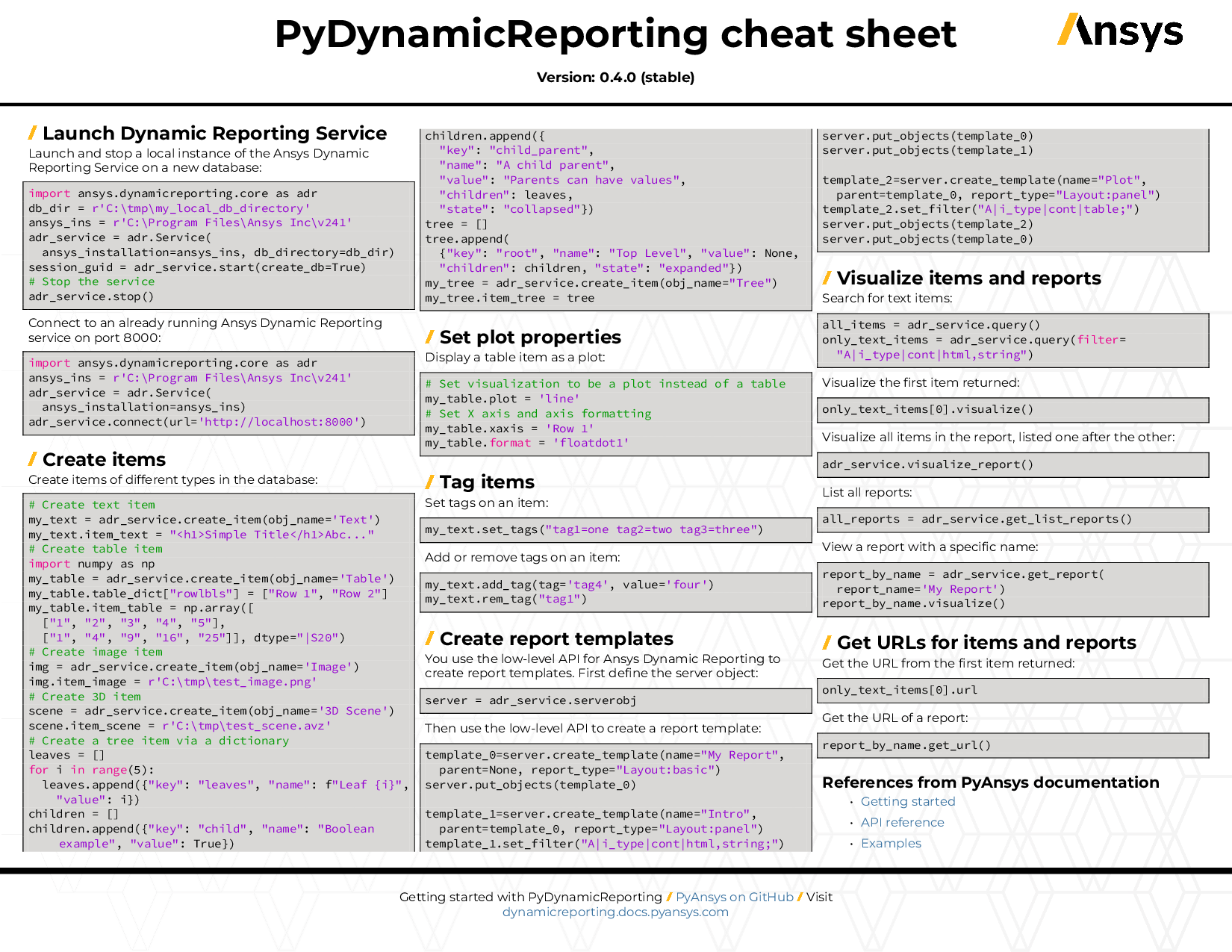
You can also view or download the PyDynamicReporting cheat sheet. This one-page reference provides syntax rules and commands for using PyDynamicReporting.
On the PyDynamicReporting Issues page, you can create issues to report bugs and request new features. On the Discussions page on the Ansys Developer portal, you can post questions, share ideas, and get community feedback.
To reach the project support team, email pyansys.core@ansys.com.
License#
PyDynamicReporting is licensed under the MIT license.
PyDynamicReporting makes no commercial claim over Ansys whatsoever. This library extends Ansys Dynamic Reporting by adding a Python interface to Ansys Dynamic Reporting without changing the core behavior or license of the original software. The use of PyDynamicReporting requires a legally licensed copy of an Ansys product that supports Ansys Dynamic Reporting.